Best Free Logo Animation Makers in 2026: 10 Tools Compared
We compared 10 logo animation makers, LogoFuse included, on free export quality, watermarks, sign-up, vertical video, and price. Every competitor fact was checked on the vendor’s own site in November 2026.
 LogoFuse Team
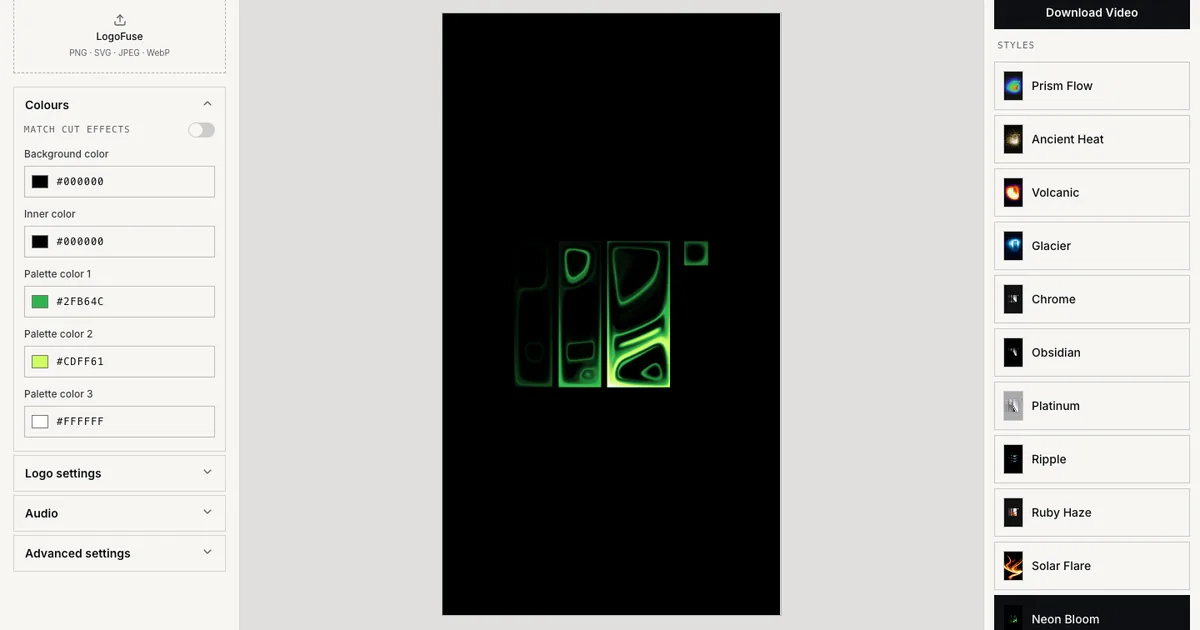
Short answer: for a free, watermark-free vertical logo video without creating an account, use LogoFuse (720p, 9:16). For a free horizontal or square logo animation built from a template, use Canva Free, which exports 1080p MP4 without a watermark if you avoid premium elements. If you can accept a watermark on the free plan, FlexClip, Jitter, and Renderforest offer far bigger template libraries than LogoFuse.
Key takeaways
- Only three of the ten tools say free exports can be watermark-free: LogoFuse, Canva (free elements only), and Adobe Express (its video pages say "watermark-free" without naming a plan).
- Most template tools cap free exports at 720p and add a watermark: FlexClip, Jitter, Kapwing, and Renderforest.
- LogoFuse documents 720p export with no account at all. LogoMotion’s terms say some export features work without an account, and Adobe’s mobile app allows one export before sign-in; most other tools send you to a sign-up or login page first.
- LogoFuse and LogoMotion are the only tools here built specifically for vertical 9:16 logo videos. Template tools offer more formats and many more designs.
- No tool here is "free forever" for everything: 4K, Full HD, or watermark removal usually costs between $7.99 once and $45 a month.
We make LogoFuse, so read this as a comparison written by one of the vendors. To keep it useful, we list where LogoFuse is weaker than the others, and every competitor fact links to that company’s own pricing page or help center. Facts were checked on November 3, 2026; each tool is marked "as listed in November 2026".
Comparison table
| Tool | How it animates | Free export | Watermark on free | Account to export | Paid from (USD) |
|---|---|---|---|---|---|
| LogoFuse | Shader presets, Flash scene cuts, 3D Pulse; 9:16 only | 720p; 1080p Logo Motion and 3D after sign-in | No | Not for 720p | $7.99 once (5 Premium Exports); $12.99/mo |
| LogoMotion | Logo Match Cut and Pulse 3D; vertical | 720p | Not stated | Editor prompts a free account | Pro $12.99/mo (shown in editor) |
| Canva | Templates plus Animate effects | MP4 at default 1080p | Only on premium elements | Not stated; start button leads to sign-up | Pro $12/mo billed yearly, $18 monthly |
| Adobe Express | Templates plus animation effects; square templates | Max resolution not stated; no 4K | Video pages say "watermark-free"; plan not named | Web: not stated; mobile app: 1 export without sign-in | Premium $9.99/mo |
| Renderforest | Fixed-length logo templates | HD 720 (help center) | Yes | Yes | Lite $9/mo billed annually (720p); Pro $19/mo billed annually (1080p) |
| Placeit | Intro and logo-reveal templates; mostly 16:9 | Not stated | Not stated | Not stated | $89.69/yr ($7.47/mo equivalent) |
| FlexClip | Templates, AI, timeline editor | 720p | Yes | Yes | Plus $11.99/mo billed annually, $19.99 monthly |
| Jitter | Motion-design templates and timeline | 720p, 30fps | Yes | Template remix goes to login | Pro $15/editor/mo billed annually, $19 monthly |
| Animaker | 100+ logo templates | 3 downloads a month; resolution not stated | Yes | Not stated; start button leads to sign-up | Starter $25/mo billed yearly, $45 monthly |
| Kapwing | AI prompt on your uploaded logo | 720p | Yes (pricing page) | Official pages conflict | Pro $16/mo billed annually, $24 monthly |
"Not stated" means we could not find the fact on the vendor’s official pages. Prices are what a logged-out visitor in the US saw on November 3, 2026.
How we compared
We looked only at tools that can animate a logo you already own, then checked five things on each vendor’s own site: how the animation is made, the free export resolution, whether free exports carry a watermark, whether you need an account to export, and the cheapest plan that removes the free limits. When a vendor’s pages contradicted each other, we say so instead of picking the friendlier answer. We did not use third-party review sites, and we did not sign up for paid plans.
1. LogoFuse
LogoFuse is a browser-based logo animation tool for vertical video. You upload an SVG, PNG, JPEG, or WebP logo and choose one of three editors: Logo Motion with 12 shader presets, the Flash editor that cuts your logo across 28 editable scenes, or 3D Pulse. Rendering and encoding run in your browser, so the logo file is not uploaded for rendering.
- Free: 720p export without an account and without a watermark; 1080p Logo Motion and 3D exports after sign-in. You keep the rights to exported videos, including commercial use of free 720p output.
- Paid: a one-time Project Pack at $7.99 for 5 Premium Exports that never expire, or Creator at $12.99 a month for 40 Premium Exports. A Premium Export is one 4K export or one Flash 1080p/4K export. See pricing.
- Where LogoFuse is weaker:
- It only makes 9:16 vertical video. There is no 16:9 or square canvas, and no transparent-background export.
- The library is small: 12 shader presets, 28 Flash frames, and one 3D sequence, compared with hundreds or thousands of templates elsewhere.
- There are no cloud projects. Project files are saved on your device.
- 4K depends on your browser’s video encoder, GPU limits, and memory. It works best in a current desktop browser, and there is no mobile app.
- It does not create logos. You need an existing logo file.
- Best for: a quick, watermark-free logo reveal or launch clip for TikTok, Reels, Shorts, or Product Hunt.
2. LogoMotion
LogoMotion is a browser tool for vertical brand videos with two styles: Logo Match Cut, which drops your logo into a fast sequence of scenes, and Pulse, a beat-synced 3D logo animation. Its privacy policy says logo files and exported videos are processed in your browser and not uploaded to its servers. The homepage says it is "Trusted by 24,000 users worldwide".
- Free: a 720×1280 (720p) export. The editor shows a "Create a free account to export video" prompt, although its terms say some create and export features work without an account.
- Paid: LogoMotion has no public pricing page. Its editor’s upgrade dialog shows Pro at $12.99 a month with Full HD (1080p) export, 40 Full HD cloud renders a month, cloud projects, custom audio, and video frames. The terms offer a refund request within 7 days of the first purchase.
- Limitations: Full HD, 4K, custom audio upload, and Pulse are behind Pro ("Join Pro to access Pulse"), and there is no one-time purchase in the dialog.
- Best for: match-cut logo videos and beat-synced 3D reveals if you are happy to subscribe. We compare it in more detail in LogoMotion alternatives.
3. Canva
Canva’s logo animation maker starts from an animated-logo template or a blank design. You upload your logo and apply preset effects such as Rise, Pan, Pop, or Breathe with the Animate button.
- Free: Canva’s help center says free users download MP4 at the default 1080p (up to 1920×1080 and 30 minutes) and GIFs up to 1280×720. Choosing 480p, 720p, or 4K triggers an upgrade prompt (download as video).
- Watermark: only premium elements are watermarked for free users (watermarks). A design made only from free elements downloads without one.
- Paid: Canva Pro is US$144 a year on the pricing page, which Canva describes as US$12 a month billed yearly or US$18 month-to-month. Prices are for the US and exclude tax.
- Limitations: the animated-logo pages do not document a 9:16 logo export, and transparent backgrounds are a paid feature.
- Best for: square or horizontal logo animations built from templates, especially if you already design in Canva.
4. Adobe Express
Adobe Express’s animated logo maker combines templates with animation effects. Its how-to steps start by generating new logo ideas, but you can also add your own logo and image assets.
- Free: Adobe Express Free costs nothing and needs no credit card. Its pricing table marks 4K export as Premium-only and caps free videos at 30 minutes. The free export resolution is not stated.
- Watermark: Adobe’s video pages say you can "save your videos watermark-free" but do not name a plan.
- Paid: Premium is US$9.99 a month with no annual commitment.
- Limitations: logo templates are square (500 to 1200 px), and 9:16 is not mentioned on the logo pages. GIF exports are limited to 60 seconds and cannot have a transparent background.
- Best for: people already in the Adobe ecosystem who want simple square animated logos.
5. Renderforest
Renderforest inserts your uploaded logo into ready-made logo reveal templates with fixed durations.
- Free: you need an account to export. Renderforest’s help center describes the free option as "HD 720 with watermark", although the logo page FAQ lists 360p, HD720, and HD1080 without saying which plan gets which.
- Paid: on the subscription page, Lite costs $9 a month billed annually or $15 monthly and exports templates at HD 720. Pro, the cheapest plan with HD1080 and no watermark, costs $19 a month billed annually or $39 monthly. A single watermark-free HD1080 export costs $24. The annual prices were shown next to struck-through full prices, so they may be a temporary sale.
- Limitations: most logo templates have fixed lengths, and we found one portrait (vertical) logo template.
- Best for: a polished horizontal logo intro for YouTube or a presentation.
6. Placeit by Envato
Placeit’s intro maker has more than 1,600 intro and logo-reveal templates. You drag in a JPG or PNG logo and adjust each slide.
- Free: Placeit has some free templates but no free trial. Its official pages do not state the free export resolution or watermark policy.
- Paid: the Unlimited subscription is listed on the pricing page as "Billed yearly at $89.69 USD ($7.47/mo equivalent)". The monthly price was not shown in the page text we could read.
- Limitations: Placeit’s help center says its "Animated logo" templates do not accept your own logo; only intro and logo-reveal templates do. Almost all intro templates are tagged 16:9.
- Best for: many horizontal intro styles at a low yearly price.
7. FlexClip
FlexClip’s logo animation maker offers templates, AI generation, and a timeline editor. You can upload a transparent PNG logo.
- Free: 720p downloads with unlimited exports, but you must log in to export, and the help center says free exports "will include a watermark".
- Paid: Plus is US$11.99 a month billed annually or US$19.99 monthly on the pricing page, with 1080p and no watermark.
- Formats: MP4 and GIF; aspect ratios include 16:9, 9:16, 1:1, 4:5, and 21:9.
- Best for: people who want a general video editor with logo templates and vertical output.
8. Jitter
Jitter is a web motion-design tool with animated logo templates and a timeline that uses actions instead of keyframes. You can import SVG logos.
- Free: 720p at 30fps with a Jitter watermark; template "Remix for free" buttons lead to a login page.
- Paid: Pro is $15 per editor a month billed annually or $19 monthly (pricing), with 1080p 60fps, ProRes, and WebM. Transparent exports need the Max plan.
- Limitations: aspect ratio depends on the template: some logo templates offer 9:16, others are 16:9 only.
- Best for: designers who want more motion control than presets allow.
9. Animaker
Animaker’s logo animation page offers 100+ templates; many are styled as YouTube channel intros. You swap in your own logo.
- Free: three downloads a month with an Animaker watermark. The free resolution is not stated in pixels; Full HD needs a paid plan.
- Paid: the cheapest plan on the pricing page is Starter at $25 a month billed yearly or $45 monthly, with 10 watermark-free downloads a month.
- Platforms: web, plus iOS and Android apps.
- Best for: channel intros and character-style animated videos.
10. Kapwing
Kapwing’s animated logo maker is AI-based: you attach your logo and describe the motion in a prompt. Separate logo video templates are also available.
- Free: 720p exports. Kapwing’s pricing and AI pages say free exports are watermarked, while its logo page says the AI toolkit can be tried without watermarks. The free plan includes 10 lifetime credits, and Kapwing’s help says an AI video costs "20+ credits", so free AI logo animation may not be possible.
- Paid: Pro is $16 a month billed annually or $24 monthly (pricing), without a watermark and with 4K export.
- Best for: describing an animation in words instead of choosing a template.
Which one should you choose?
- You need a vertical logo clip today, free, with no watermark: LogoFuse. Use Flash for a fast multi-scene launch video and Logo Motion for a single continuous reveal.
- You want a horizontal or square animation from a template: Canva Free if you avoid premium elements; Renderforest or Placeit if you want more intro styles and can pay.
- You want fine motion control: Jitter.
- You want AI to invent the motion: Kapwing or FlexClip, budgeting for a paid plan.
- You want LogoMotion’s match-cut style with a one-time payment: see LogoMotion alternatives.
If you are new to the category, what is logo motion explains the terms, and the LogoFuse tutorial walks through a first export in five steps.
Frequently asked questions
What is the best free logo animation maker?
It depends on what "free" has to mean for you. If you need a watermark-free vertical video without signing up, LogoFuse exports 720p with no account and no watermark. If you need a horizontal or square template, Canva Free exports MP4 at 1080p without a watermark as long as you avoid premium elements, but you need a Canva account. FlexClip, Jitter, Animaker, Kapwing, and Renderforest all watermark free exports.
Can I animate my logo for free without a watermark?
Yes. LogoFuse adds no watermark to free exports (720p without an account, 1080p for Logo Motion and 3D after sign-in). Canva Free only watermarks premium elements. Adobe Express says its video exports are watermark-free but does not tie that statement to a plan. FlexClip, Jitter, Animaker, Kapwing, and Renderforest state that free exports carry their watermark.
Which logo animation maker exports 9:16 video for TikTok, Reels, and Shorts?
LogoFuse and LogoMotion are built for vertical 9:16 logo videos. FlexClip, Animaker, and Kapwing document 9:16 as a supported ratio, and some Jitter logo templates offer 9:16. Canva and Adobe Express can resize designs, but their animated-logo pages do not document a 9:16 logo export, and Placeit’s intro templates are almost all 16:9.
Do I need After Effects to animate a logo?
No. Every tool in this list runs in a web browser and uses presets or templates instead of keyframes. After Effects is still the better choice when you need frame-level control or transparent masters for a broadcast package.
Is LogoFuse an AI logo generator?
No. LogoFuse animates a logo you already have with deterministic shader, scene, and 3D presets. It does not generate or redesign a logo from a prompt. If you still need a logo, create it first and bring the SVG or PNG to LogoFuse.
How often are these comparisons updated?
The facts in this article were checked on each vendor’s official site on November 3, 2026, and we re-check them every quarter. Prices are US prices shown to a logged-out visitor and can change, so open the linked pricing page before you buy.